Test Sheet: EDIMM Starterkit 2.0
Yocto Version
This test sheet targets the scarthgap release of the ST BSP. If you are working on a different Yocto version, refer to the corresponding test sheet on the meta-engicam-st branch for your release.
Test Sheet iCore STM32MP157 — EDIMM Starterkit 2.0
Kernel
| Status | Test | Notes |
|---|---|---|
| OK | Ethernet | |
| OK | USB | |
| OK | MMC card | |
| OK | EMMC Flash | |
| OK | NAND Flash | |
| TBT | Display | |
| TBT | UART 232 | ttySTM1 |
| TBT | UART 485 | ttySTM2 |
| OK | Linux Console | ttySTM0 |
| TBT | CANBUS1 | |
| TBT | CANBUS2 | |
| OK | WIFI | |
| OK | Bluetooth | |
| TBT | Touchscreen | |
| OK | Backlight Control |
UART 232
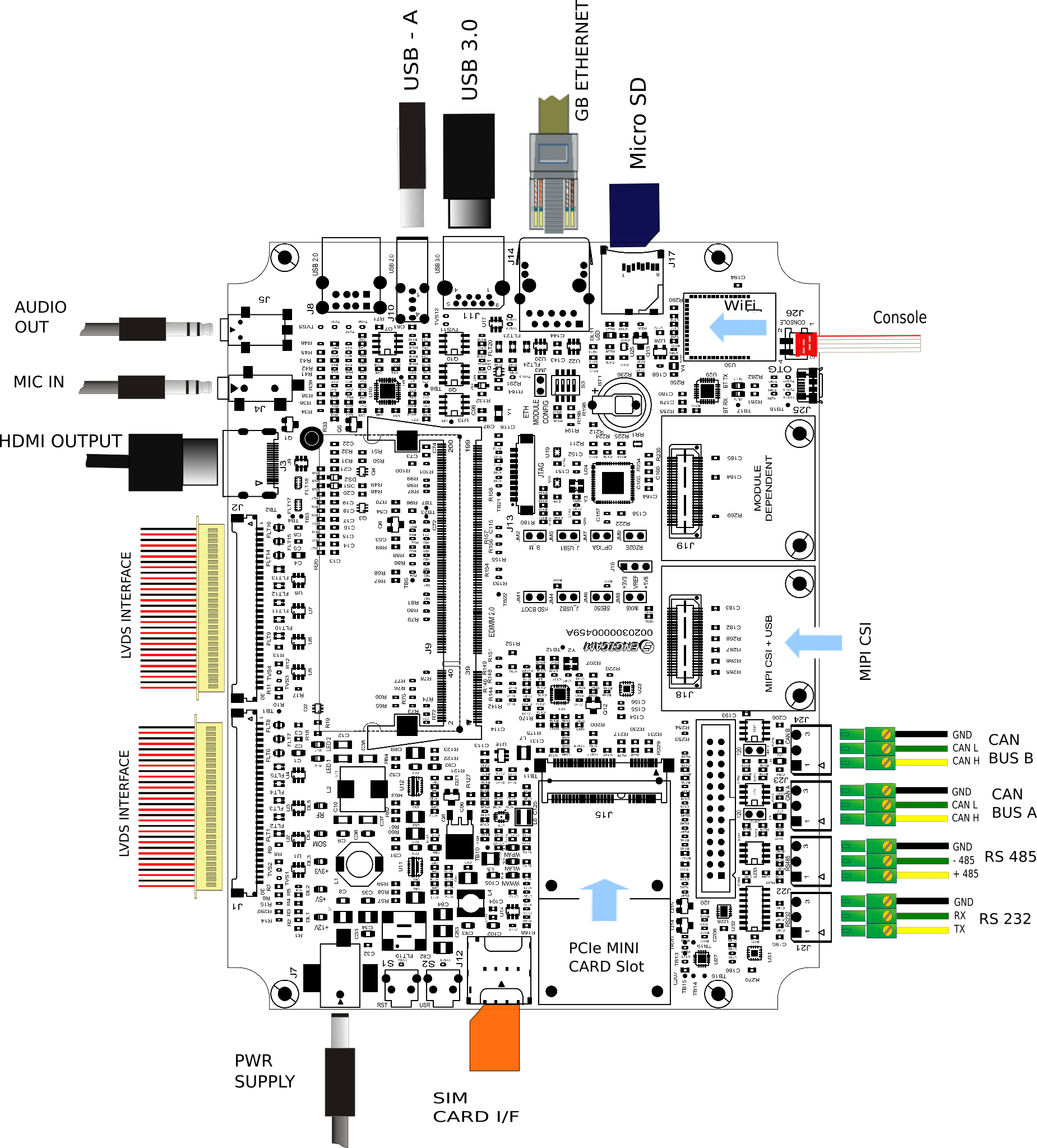
On J21 connector close TX with RX and use minicom on ttySTM1 to test local echo.
UART 485
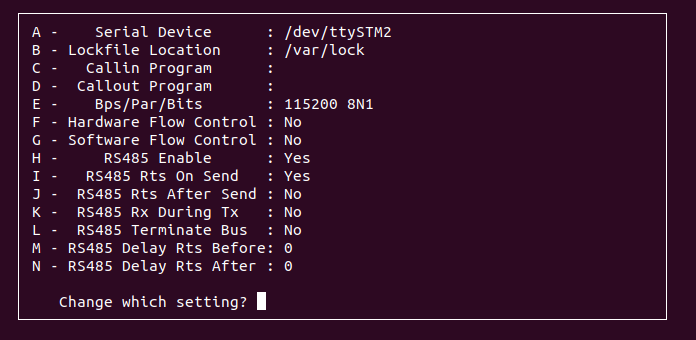
Tested /dev/ttySTM2 (connector J22) with another RS485 device. Configure minicom:
Configure the Serial Port Setup as shown:
Wi-Fi
ifconfig eth0 down
echo "nameserver 8.8.8.8" > /etc/resolv.conf
ifconfig wlan0 up
iw dev wlan0 scan | grep SSID
wpa_passphrase SSID password > /etc/wpa_supplicant.conf
wpa_supplicant -iwlan0 -Dnl80211 -c/etc/wpa_supplicant.conf -B
udhcpc -i wlan0
Bluetooth
brcm_patchram_plus --patchram /lib/firmware/brcm/BCM43430A1.hcd --enable_hci \
--no2bytes --tosleep 1000 --baudrate 3000000 \
--use_baudrate_for_download /dev/ttyUSB0 &

hciconfig hci0 up
bluetoothctl
agent on
scan on
CAN Interfaces
Connect the CANBUS connectors J23 and J24.
ip link set can0 type can bitrate 125000
ip link set can1 type can bitrate 125000
ifconfig can0 up
ifconfig can1 up

cansend can0 123#1122334455667788
candump can0

cansend can1 123#1122334455667788
candump can1
Backlight Control
Test Sheet iCore STM32MP2 — EDIMM Starterkit 2.0
Kernel
| Status | Test | Notes |
|---|---|---|
| OK | Ethernet | |
| OK | USB | |
| OK | MMC card | |
| OK | EMMC Flash | |
| OK | Display | |
| OK | UART 232 | ttySTM1 |
| OK | UART 485 | ttySTM2 |
| OK | Linux Console | ttySTM0 |
| OK | CANBUS1 | |
| OK | CANBUS2 | |
| OK | WIFI | |
| OK | Bluetooth | |
| OK | Touchscreen | |
| OK | Backlight Control | |
| OK | CSI camera |
UART 232
On J21 connector close TX with RX and use minicom on ttySTM1 to test local echo.
UART 485
Tested /dev/ttySTM2 (connector J22) with another RS485 device. Configure minicom:
Configure the Serial Port Setup as shown:
Wi-Fi
ifconfig eth0 down
echo "nameserver 8.8.8.8" > /etc/resolv.conf
ifconfig wlan0 up
iw dev wlan0 scan | grep SSID
wpa_passphrase SSID password > /etc/wpa_supplicant.conf
wpa_supplicant -iwlan0 -Dnl80211 -c/etc/wpa_supplicant.conf -B
udhcpc -i wlan0
Bluetooth
brcm_patchram_plus --patchram /lib/firmware/brcm/BCM43430A1.hcd --enable_hci \
--no2bytes --tosleep 1000 --baudrate 3000000 \
--use_baudrate_for_download /dev/ttyUSB0 &
hciconfig hci0 up
bluetoothctl
agent on
scan on
CAN Interfaces
Connect the CANBUS connectors J23 and J24.
ip link set can0 type can bitrate 125000
ip link set can1 type can bitrate 125000
ifconfig can0 up
ifconfig can1 up
cansend can0 123#1122334455667788
candump can0
cansend can1 123#1122334455667788
candump can1
Backlight Control
echo 1 > /sys/class/backlight/panel-backlight/brightness
echo 0 > /sys/class/backlight/panel-backlight/brightness
CSI Camera
Tested with Arducam OV5640 connected via 470- adapter to connector J18.
Resolution 640x480:
media-ctl -d platform:48030000.dcmipp -r
media-ctl -d platform:48030000.dcmipp -l '"48020000.csi":1->"dcmipp_input":0[1]'
media-ctl -d platform:48030000.dcmipp -l "'dcmipp_input':2->'dcmipp_main_isp':0[1]"
media-ctl -d platform:48030000.dcmipp --set-v4l2 '"ov5640 0-003c":0[fmt:RGB565_1X16/640x480]'
media-ctl -d platform:48030000.dcmipp --set-v4l2 '"48020000.csi":1[fmt:RGB565_1X16/640x480]'
media-ctl -d platform:48030000.dcmipp --set-v4l2 '"dcmipp_input":2[fmt:RGB565_1X16/640x480 field:none]'
media-ctl -d platform:48030000.dcmipp --set-v4l2 '"dcmipp_main_isp":1[fmt:RGB888_1X24/640x480 field:none]'
media-ctl -d platform:48030000.dcmipp --set-v4l2 '"dcmipp_main_postproc":0[compose:(0,0)/640x480]'
media-ctl -d platform:48030000.dcmipp --set-v4l2 '"dcmipp_main_postproc":1[fmt:RGB888_1X24/640x480]'

gst-launch-1.0 v4l2src device=/dev/video1 ! 'video/x-raw,format=RGB16,width=640,height=480,framerate=30/1' ! videoconvert ! autovideosink
Resolution 1024x600:
media-ctl -d platform:48030000.dcmipp -r
media-ctl -d platform:48030000.dcmipp -l '"48020000.csi":1->"dcmipp_input":0[1]'
media-ctl -d platform:48030000.dcmipp -l "'dcmipp_input':2->'dcmipp_main_isp':0[1]"
media-ctl -d platform:48030000.dcmipp --set-v4l2 '"ov5640 0-003c":0[fmt:RGB565_1X16/1024x600]'
media-ctl -d platform:48030000.dcmipp --set-v4l2 '"48020000.csi":1[fmt:RGB565_1X16/1024x600]'
media-ctl -d platform:48030000.dcmipp --set-v4l2 '"dcmipp_input":2[fmt:RGB565_1X16/1024x600 field:none]'
media-ctl -d platform:48030000.dcmipp --set-v4l2 '"dcmipp_main_isp":1[fmt:RGB888_1X24/1024x600 field:none]'
media-ctl -d platform:48030000.dcmipp --set-v4l2 '"dcmipp_main_postproc":0[compose:(0,0)/1024x600]'
media-ctl -d platform:48030000.dcmipp --set-v4l2 '"dcmipp_main_postproc":1[fmt:RGB888_1X24/1024x600]'

gst-launch-1.0 v4l2src device=/dev/video1 ! 'video/x-raw,format=RGB16,width=1024,height=600,framerate=30/1' ! videoconvert ! autovideosink