Test Sheet: Micro 5
Yocto Version
This test sheet targets the scarthgap release of the ST BSP. If you are working on a different Yocto version, refer to the corresponding test sheet on the meta-engicam-st branch for your release.
Test Sheet MicroGea STM32MP2 — Micro 5
Kernel
| Status | Test | Notes |
|---|---|---|
| OK | Ethernet | |
| OK | USB | |
| OK | MMC card | |
| OK | Display | |
| OK | UART 232 | ttySTM3 |
| OK | UART 485 | ttySTM1 |
| OK | Linux Console | ttySTM0 |
| OK | CANBUS1 | can0 |
| OK | Audio | |
| OK | Touchscreen | |
| OK | Backlight Control | |
| OK | WIFI | |
| OK | Bluetooth | ttySTM3 |
| TBT | UMTS |
UART 232
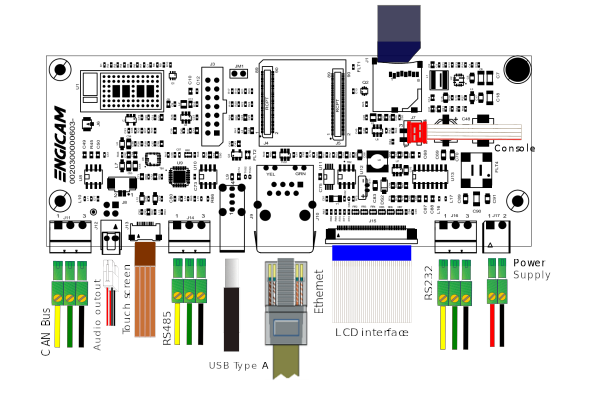
Connect TX/RX PIN connector to the UART 232 port on J31. From terminal run minicom:
Disable Hardware Flow Control and set Serial Device to /dev/ttySTM3. Check that characters typed from keyboard are echoed in the terminal.
UART 485
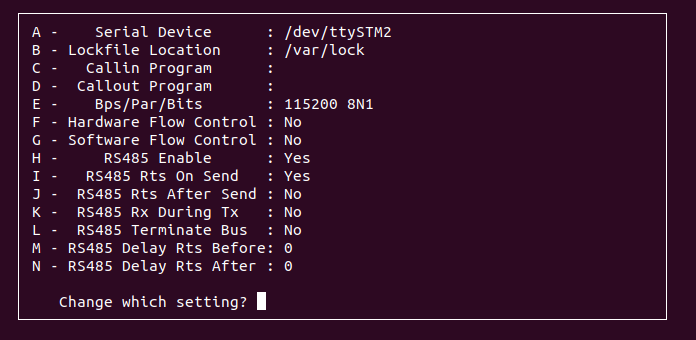
Tested /dev/ttySTM1 with another RS485 device. Configure minicom:
Configure the Serial Port Setup as shown:
Wi-Fi
ifconfig end0 down
echo "nameserver 8.8.8.8" > /etc/resolv.conf
insmod /lib/modules/6.1.82/extra/mlan.ko
insmod /lib/modules/6.1.82/extra/moal.ko mod_para=nxp/wifi_mod_para.conf
ifconfig mlan0 up
iw dev mlan0 scan | grep SSID
wpa_passphrase SSID password > /etc/wpa_supplicant.conf
wpa_supplicant -imlan0 -Dnl80211 -c/etc/wpa_supplicant.conf -B
udhcpc -i mlan0
Bluetooth
Available as option. May require antenna depending on WIFI_MODE state.
CAN Interfaces
Connect CANBUS pins on J2 to a compatible transceiver.
ip link set can0 type can bitrate 125000
ifconfig can0 up

cansend can0 123#1122334455667788
candump can0
Audio
Backlight Control
echo 1 > /sys/class/backlight/panel-backlight/brightness
echo 0 > /sys/class/backlight/panel-backlight/brightness
Touchscreen
Expected output:
Press 0 and Enter, then touch the screen.