Test Sheet: MicroGea Evaluation Board
Yocto Version
This test sheet targets the scarthgap release of the ST BSP. If you are working on a different Yocto version, refer to the corresponding test sheet on the meta-engicam-st branch for your release.
Test Sheet MicroGea STM32MP257D — Microgea Evaluation Board
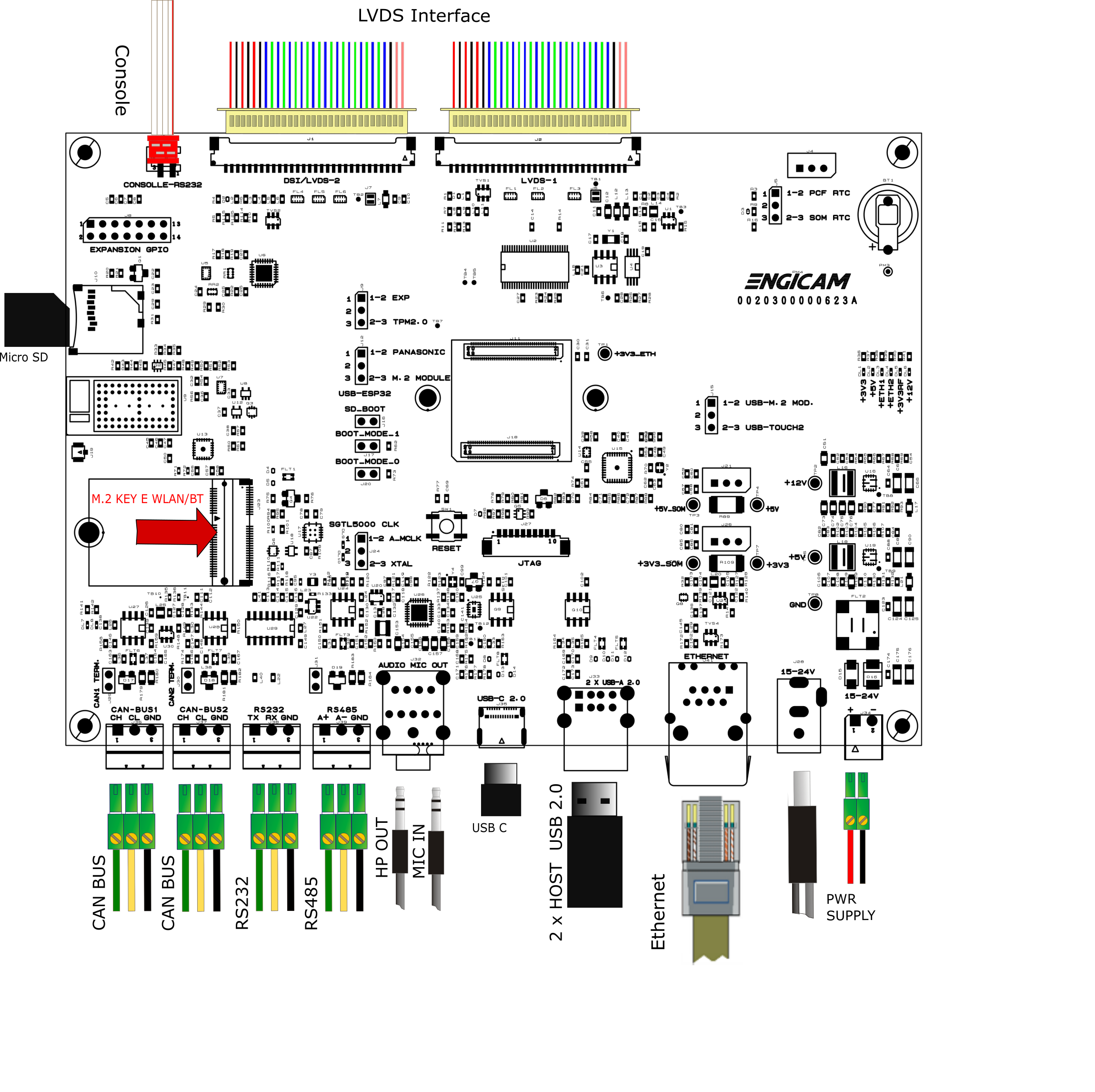
Kernel
| Status | Test | Note |
|---|---|---|
| OK | Ethernet 0 (J41) | Please see Note-Ethernet |
| OK | USB 2.0 (J33) | Tested with USB stick |
| TBT | USB C (J35) | PLease see Note-USB-C |
| OK | SD card (J16 closed) | Boot system from SD card |
| TBT | eMMC card (J16 open) | Boot system from eMMC |
| OK | UART 232 (J38) | Read/Write test. Please see Note-RS232 |
| OK | UART 485 (J39) | Please see Note-RS485 |
| OK | Linux Console (J3) | Opened with minicom |
| OK | WIFI | Please see Note-Wifi |
| OK | BLUETOOTH | Please see Note-Bluetooth |
| OK | RTC | Please see Note-RTC |
| OK | Reboot | Manual test |
| OK | Reboot button (SW1) | Manual test |
| OK | LVDS | see Note-LVDS |
| OK | Backlight | see Note-Backlight |
| OK | Touchscreen | see Note-Touchscreen |
| OK | Audio (J32) | see Note-Audio |
| OK | CAN 0 (J36) | Please see Note-CAN |
| OK | CAN 1 (J37) | Please see Note-CAN |
| TBT | PCIe (KEY E) (J23) | |
| OK | Expansion Connector (J8) | Please see Note-Expansion-connector |
| OK | TPM (U6) | Please see Note-TPM |
Note Ethernet
Note USB-C
Ethernet gadget Test
With board (J35) connected to Linux PC
# ON BOARD
ifconfig usb0
# usb0      Link encap:Ethernet  HWaddr 72:CB:1A:DE:34:3A
#           inet addr:192.168.7.1  Bcast:192.168.7.255  Mask:255.255.255.0
#           inet6 addr: fe80::70cb:1aff:fede:343a/64 Scope:Link
#           UP BROADCAST RUNNING MULTICAST  MTU:1500  Metric:1
#           RX packets:158 errors:0 dropped:0 overruns:0 frame:0
#           TX packets:109 errors:0 dropped:0 overruns:0 carrier:0
#           collisions:0 txqueuelen:1000
#           RX bytes:35766 (34.9 KiB)  TX bytes:22172 (21.6 KiB)

# FROM CONNECTED PC
ssh root@192.168.7.1
Storage gadget Test
With board (J35) connected to Linux PC
# 1. Bring down the USB network interface gracefully to prevent the kernel crash
ip link set dev usb0 down 2>/dev/null || ifconfig usb0 down 2>/dev/null

# 2. Ensure the kernel's debug filesystem is mounted
mount -t debugfs none /sys/kernel/debug 2>/dev/null

# 3. Safely unbind the boot gadget (This should no longer crash!)
echo "" > /sys/kernel/config/usb_gadget/g1/UDC

# 4. Trick the PC's driver cache with a new ID
echo 0x6666 > /sys/kernel/config/usb_gadget/g1/idProduct

# 5. Add your Mass Storage drive
mkdir -p /sys/kernel/config/usb_gadget/g1/functions/mass_storage.0
echo /dev/mmcblk1p7 > /sys/kernel/config/usb_gadget/g1/functions/mass_storage.0/lun.0/file
echo 1 > /sys/kernel/config/usb_gadget/g1/functions/mass_storage.0/lun.0/removable
ln -s /sys/kernel/config/usb_gadget/g1/functions/mass_storage.0 /sys/kernel/config/usb_gadget/g1/configs/c.1/ 2>/dev/null

# 6. Bind the gadget to the hardware controller
echo 48300000.usb > /sys/kernel/config/usb_gadget/g1/UDC

# ON CONNECTED PC
lsusb
# ...
# Bus 003 Device 020: ID 1d6b:6666 Linux Foundation STM32MP1
# ...
Note RS232
Close TX/RX pins on connector J38
Note RS485
Tested with other RS485 device connected on port J39
Note WIFI
Closed jumper J12 before boot on position:
- 1-2 (PANASONIC) to enable pan9028 Wifi/BT module or
- 2-3 (M.2 MODULE) to enable PCIe Wifi/BT module.
ifconfig end0 down
ifconfig end1 down

echo "nameserver 8.8.8.8" > /etc/resolv.conf

modprobe /usr/lib/modules/*/updates/mlan.ko
modprobe /usr/lib/modules/*/updates/moal.ko mod_para=nxp/wifi_mod_para.conf

ifconfig mlan0 up

iw dev mlan0 scan | grep SSID
wpa_passphrase SSID password > /etc/wpa_supplicant.conf
wpa_supplicant -imlan0 -Dnl80211 -c/etc/wpa_supplicant.conf -B

udhcpc -i mlan0

ping 8.8.8.8 -I mlan0
Note Bluetooth
Closed jumper J12 before boot on position:
- 1-2 (PANASONIC) to enable pan9028 Wifi/BT module or
- 2-3 (M.2 MODULE) to enable PCIe Wifi/BT module.
modprobe /usr/lib/modules/*/updates/mlan.ko
modprobe /usr/lib/modules/*/updates/moal.ko mod_para=nxp/wifi_mod_para.conf

hciattach -b /dev/ttySTM3 any 3000000 flow
bluetoothctl
  # Inside the shell:
  power on
  agent on
  default-agent
  scan on
Note RTC
Close pins 1 and 2 on jumper J5 to use the board's rtc (rtc0). Close pins 2 and 3 on jumper J5 to use the som's rtc (rtc1).
timedatectl set-ntp off
date -s "2000-01-01"
# For board rtc
hwclock -w -f /dev/rtc0
# For som rtc
hwclock -w -f /dev/rtc1
sync

# Turn off the system and power it back on. Once it booted check that the date is the same:

# For board rtc
hwclock
# For som rtc
hwclock -f /dev/rtc1
Note LVDS
If weston is not visible run
Note Backlight
Tested with command:
where n is an integer from 0 to 10Note Touchscreen
Tested with command:
Note Audio
Close jumper J24 (sgtl5000 clk) pins 1-2 (A_MCLK) Test headphones with:
Record an audio file with:
arecord -D hw:0,1 -f S16_LE -r 48000 -c 2 -d 5 /tmp/test-mic.wav
# Check with command
aplay /tmp/test-mic.wav
Note CAN
Connected J36 or J37 ports and closed jumpers J29 and J30
# J36
ip link set can0 type can bitrate 125000
# J37
ip link set can1 type can bitrate 125000

ifconfig can0 up
ifconfig can1 up

cantest can0 &
cantest can1 5A1#11.2233.44556677.88
cantest can1 &
cantest can0 5A1#11.2233.44556677.88
Note Expansion Connector
UART 4 - RS232
Close pins 1 and 2 of the expansion connector (J8)
SPI
Tested on TPM
I2C2
Tested with touchscreen
GPIO_EXP
Close pins 13 and 14 of the expansion connector (J8)
# Mnually set one of the gpio
gpioset GPIO_EXP1=1 &
gpioset GPIO_EXP2=1 &

# Read status of other
gpioget GPIO_EXP2
gpioget GPIO_EXP1

# Status are aligned if correctly connected
Note TPM
Close J9's pins 2 and 3 (XTAL)
cat /sys/class/tpm/tpm0/tpm_version_major
# Expected output: 2

ls -l /dev/tpm0
# Expected output:
#crw------- 1 root root 10, 224 Aug  5 13:28 /dev/tpm0

ls -l /sys/class/tpm/tpm0/
# Expected output:
# total 0
# -r--r--r-- 1 root root 4096 Aug  5 12:56 dev
# lrwxrwxrwx 1 root root    0 Aug  5 12:56 device -> ../../../spi0.0
# drwxr-xr-x 2 root root    0 Aug  5 12:56 pcr-sha1
# drwxr-xr-x 2 root root    0 Aug  5 12:56 pcr-sha256
# drwxr-xr-x 2 root root    0 Aug  5 12:56 power
# lrwxrwxrwx 1 root root    0 Aug  5 12:56 subsystem -> ../../../../../../../../../../class/tpm
# -r--r--r-- 1 root root 4096 Aug  5 12:56 tpm_version_major
# -rw-r--r-- 1 root root 4096 Aug  5 12:56 uevent
Test Sheet MicroGea STM32MP257D — Microgea Evaluation Board
Kernel
| Status | Test | Note |
|---|---|---|
| OK | Ethernet 0 (J41) | Please see Note-Ethernet |
| OK | USB 2.0 (J33) | Tested with USB stick |
| TBT | USB C (J35) | PLease see Note-USB-C |
| OK | SD card (J16 closed) | Boot system from SD card |
| TBT | eMMC card (J16 open) | Boot system from eMMC |
| OK | UART 232 (J38) | Read/Write test. Please see Note-RS232 |
| OK | UART 485 (J39) | Please see Note-RS485 |
| OK | Linux Console (J3) | Opened with minicom |
| OK | WIFI | Please see Note-Wifi |
| OK | BLUETOOTH | Please see Note-Bluetooth |
| OK | RTC | Please see Note-RTC |
| OK | Reboot | Manual test |
| OK | Reboot button (SW1) | Manual test |
| OK | LVDS | see Note-LVDS |
| OK | Backlight | see Note-Backlight |
| OK | Touchscreen | see Note-Touchscreen |
| OK | Audio (J32) | see Note-Audio |
| OK | CAN 0 (J36) | Please see Note-CAN |
| OK | CAN 1 (J37) | Please see Note-CAN |
| TBT | PCIe (KEY E) (J23) | |
| OK | Expansion Connector (J8) | Please see Note-Expansion-connector |
| OK | TPM (U6) | Please see Note-TPM |
Note Ethernet
Note USB-C
Ethernet gadget Test
With board (J35) connected to Linux PC
# ON BOARD
ifconfig usb0
# usb0      Link encap:Ethernet  HWaddr 72:CB:1A:DE:34:3A
#           inet addr:192.168.7.1  Bcast:192.168.7.255  Mask:255.255.255.0
#           inet6 addr: fe80::70cb:1aff:fede:343a/64 Scope:Link
#           UP BROADCAST RUNNING MULTICAST  MTU:1500  Metric:1
#           RX packets:158 errors:0 dropped:0 overruns:0 frame:0
#           TX packets:109 errors:0 dropped:0 overruns:0 carrier:0
#           collisions:0 txqueuelen:1000
#           RX bytes:35766 (34.9 KiB)  TX bytes:22172 (21.6 KiB)

# FROM CONNECTED PC
ssh root@192.168.7.1
Storage gadget Test
With board (J35) connected to Linux PC
# 1. Bring down the USB network interface gracefully to prevent the kernel crash
ip link set dev usb0 down 2>/dev/null || ifconfig usb0 down 2>/dev/null

# 2. Ensure the kernel's debug filesystem is mounted
mount -t debugfs none /sys/kernel/debug 2>/dev/null

# 3. Safely unbind the boot gadget (This should no longer crash!)
echo "" > /sys/kernel/config/usb_gadget/g1/UDC

# 4. Trick the PC's driver cache with a new ID
echo 0x6666 > /sys/kernel/config/usb_gadget/g1/idProduct

# 5. Add your Mass Storage drive
mkdir -p /sys/kernel/config/usb_gadget/g1/functions/mass_storage.0
echo /dev/mmcblk1p7 > /sys/kernel/config/usb_gadget/g1/functions/mass_storage.0/lun.0/file
echo 1 > /sys/kernel/config/usb_gadget/g1/functions/mass_storage.0/lun.0/removable
ln -s /sys/kernel/config/usb_gadget/g1/functions/mass_storage.0 /sys/kernel/config/usb_gadget/g1/configs/c.1/ 2>/dev/null

# 6. Bind the gadget to the hardware controller
echo 48300000.usb > /sys/kernel/config/usb_gadget/g1/UDC

# ON CONNECTED PC
lsusb
# ...
# Bus 003 Device 020: ID 1d6b:6666 Linux Foundation STM32MP1
# ...
Note RS232
Close TX/RX pins on connector J38
Note RS485
Tested with other RS485 device connected on port J39
Note WIFI
Closed jumper J12 before boot on position:
- 1-2 (PANASONIC) to enable pan9028 Wifi/BT module or
- 2-3 (M.2 MODULE) to enable PCIe Wifi/BT module.
ifconfig end0 down
ifconfig end1 down

echo "nameserver 8.8.8.8" > /etc/resolv.conf

modprobe /usr/lib/modules/*/updates/mlan.ko
modprobe /usr/lib/modules/*/updates/moal.ko mod_para=nxp/wifi_mod_para.conf

ifconfig mlan0 up

iw dev mlan0 scan | grep SSID
wpa_passphrase SSID password > /etc/wpa_supplicant.conf
wpa_supplicant -imlan0 -Dnl80211 -c/etc/wpa_supplicant.conf -B

udhcpc -i mlan0

ping 8.8.8.8 -I mlan0
Note Bluetooth
Closed jumper J12 before boot on position:
- 1-2 (PANASONIC) to enable pan9028 Wifi/BT module or
- 2-3 (M.2 MODULE) to enable PCIe Wifi/BT module.
modprobe /usr/lib/modules/*/updates/mlan.ko
modprobe /usr/lib/modules/*/updates/moal.ko mod_para=nxp/wifi_mod_para.conf

hciattach -b /dev/ttySTM3 any 3000000 flow
bluetoothctl
  # Inside the shell:
  power on
  agent on
  default-agent
  scan on
Note RTC
Close pins 1 and 2 on jumper J5 to use the board's rtc (rtc0). Close pins 2 and 3 on jumper J5 to use the som's rtc (rtc1).
timedatectl set-ntp off
date -s "2000-01-01"
# For board rtc
hwclock -w -f /dev/rtc0
# For som rtc
hwclock -w -f /dev/rtc1
sync

# Turn off the system and power it back on. Once it booted check that the date is the same:

# For board rtc
hwclock
# For som rtc
hwclock -f /dev/rtc1
Note LVDS
If weston is not visible run
Note Backlight
Tested with command:
where n is an integer from 0 to 10Note Touchscreen
Tested with command:
Note Audio
Close jumper J24 (sgtl5000 clk) pins 1-2 (A_MCLK) Test headphones with:
Record an audio file with:
arecord -D hw:0,1 -f S16_LE -r 48000 -c 2 -d 5 /tmp/test-mic.wav
# Check with command
aplay /tmp/test-mic.wav
Note CAN
Connected J36 or J37 ports and closed jumpers J29 and J30
# J36
ip link set can0 type can bitrate 125000
# J37
ip link set can1 type can bitrate 125000

ifconfig can0 up
ifconfig can1 up

cantest can0 &
cantest can1 5A1#11.2233.44556677.88
cantest can1 &
cantest can0 5A1#11.2233.44556677.88
Note Expansion Connector
UART 4 - RS232
Close pins 1 and 2 of the expansion connector (J8)
SPI
Tested on TPM
I2C2
Tested with touchscreen
GPIO_EXP
Close pins 13 and 14 of the expansion connector (J8)
# Mnually set one of the gpio
gpioset GPIO_EXP1=1 &
gpioset GPIO_EXP2=1 &

# Read status of other
gpioget GPIO_EXP2
gpioget GPIO_EXP1

# Status are aligned if correctly connected
Note TPM
Close J9's pins 2 and 3 (XTAL)
cat /sys/class/tpm/tpm0/tpm_version_major
# Expected output: 2

ls -l /dev/tpm0
# Expected output:
#crw------- 1 root root 10, 224 Aug  5 13:28 /dev/tpm0

ls -l /sys/class/tpm/tpm0/
# Expected output:
# total 0
# -r--r--r-- 1 root root 4096 Aug  5 12:56 dev
# lrwxrwxrwx 1 root root    0 Aug  5 12:56 device -> ../../../spi0.0
# drwxr-xr-x 2 root root    0 Aug  5 12:56 pcr-sha1
# drwxr-xr-x 2 root root    0 Aug  5 12:56 pcr-sha256
# drwxr-xr-x 2 root root    0 Aug  5 12:56 power
# lrwxrwxrwx 1 root root    0 Aug  5 12:56 subsystem -> ../../../../../../../../../../class/tpm
# -r--r--r-- 1 root root 4096 Aug  5 12:56 tpm_version_major
# -rw-r--r-- 1 root root 4096 Aug  5 12:56 uevent