Test Sheet: SmarCore Evaluation Board
Yocto Version
This test sheet targets the scarthgap release of the Mediatek BSP. If you are working on a different Yocto version, refer to the corresponding test sheet on the meta-engicam-mediatek branch for your release.
Test sheet SmarCore Genio 720 Evaluation Board
Test sheet
Version: 1.0
Preliminary
Creation of rity-demo-image image for ufs booting and same image for norboot programming.
Linux Console
| Console | Baud Rate |
|---|---|
| Linux Console | 921600 |
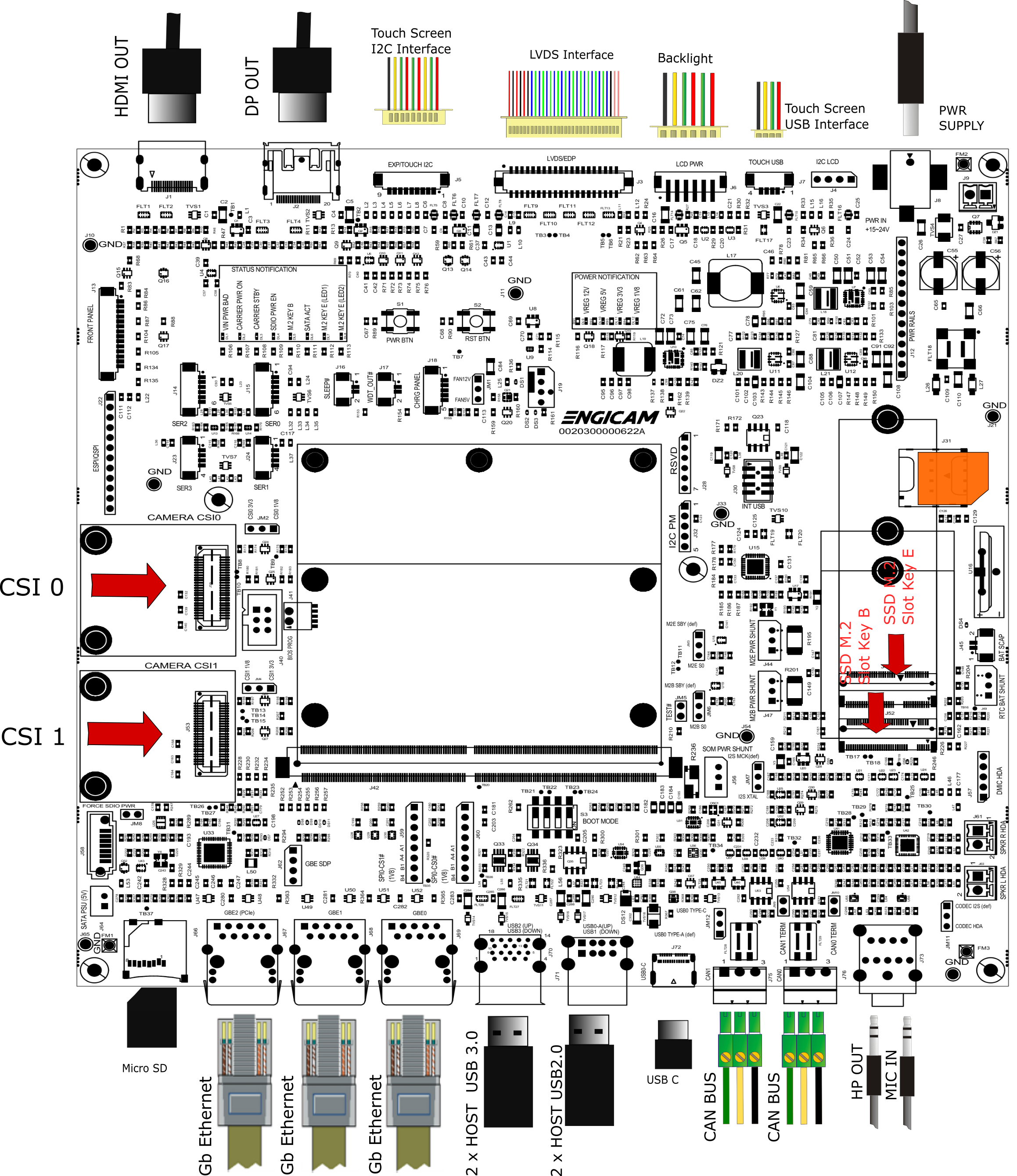
Board Type: Smarcore Evaluation Board
SOM Type: SmarCore Genio 720
U-boot tests
| Test | Status |
|---|---|
| UFS Enviroment saving | OK |
| NORBOOT Enviroment saving | OK |
| Ethernet | TBT |
| Boot from UFS | OK |
| Boot from NORBOOT | OK |
| Serial Download | OK |
Test Notes:
UFS Environment saving
setenv serverip 192.168.2.93
saveenv
    Saving Environment to scsi... Writing to SCSI device(1)... OK
reset board
printenv serverip
NORBOOT environment saving
setenv serverip 192.168.2.93
saveenv
    Saving Environment to SPIFlash... Erasing SPI flash...Writing to SPI flash...done
reset board
printenv serverip
Boot from UFS
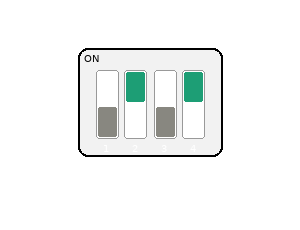
Boot from NORBOOT
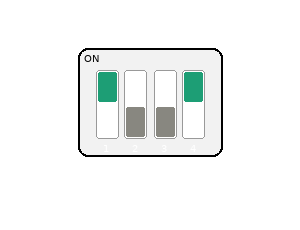
Serial Download
Close switch 4 to enable serial download. Connect the board with the source machine (i.e. the machine you are downloading the images from) by using the board's OTG header (N/A).
Power on the board.
Kernel Linux tests
| Status | Test | Note |
|---|---|---|
| OK | Ethernet (J69) | see note1 |
| OK | USB 2.0 (J71) | tested with USB stick |
| OK | USB 3.0 (J70) | tested with USB stick |
| OK | SDCARD | see note2 |
| OK | UART 232 (J14) | see note3 |
| OK | UART 232 (J23) | see note4 |
| OK | UART 232 (J24) | see note5 |
| OK | Linux Console (J15) | |
| OK | WIFI | see note6 |
| OK | BLUETOOTH | see note7 |
| OK | RTC | see note8 |
| OK | Reboot | |
| OK | DSI TO LVDS | |
| OK | Backlight | see note9 |
| OK | Touchscreen | see note10 |
| N/A | HDMI | |
| OK | Audio | see note11 |
| N/A | CAN 0/CAN 1 (J75-J76) | |
| N/A | M.2 Key E PCIe (Wifi/BT) | |
| OK | M.2 Key B PCIe (J52) | see note12 |
| OK | MIPI-CSI (Camera CSI0) | see note13 |
| OK | MIPI-CSI (Camera CSI1) | see note14 |
| OK | USB-C | see note15 |
Note
Note 1
Connect board's ethernet with your machine's one.
On your machine launch iperf3 server by typing:
On board launch iperf3 in client mode:
Using the IP address of your server machine.
Output:
Connecting to host 10.24.1.74, port 5201
[  5] local 10.24.67.160 port 34174 connected to 10.24.1.74 port 5201
[ ID] Interval           Transfer     Bitrate         Retr  Cwnd
[  5]   0.00-1.00   sec   113 MBytes   950 Mbits/sec   18    229 KBytes
[  5]   1.00-2.00   sec   112 MBytes   941 Mbits/sec    9    276 KBytes
[  5]   2.00-3.00   sec   110 MBytes   925 Mbits/sec   88    212 KBytes
[  5]   3.00-4.00   sec   112 MBytes   942 Mbits/sec   18    219 KBytes
[  5]   4.00-5.00   sec   111 MBytes   931 Mbits/sec    9    356 KBytes
[  5]   5.00-6.00   sec   112 MBytes   938 Mbits/sec    9    287 KBytes
[  5]   6.00-7.00   sec   111 MBytes   931 Mbits/sec    9    262 KBytes
[  5]   7.00-8.00   sec   111 MBytes   934 Mbits/sec    9    274 KBytes
[  5]   8.00-9.00   sec   112 MBytes   938 Mbits/sec    9    270 KBytes
[  5]   9.00-10.01  sec   112 MBytes   927 Mbits/sec    6    344 KBytes
- - - - - - - - - - - - - - - - - - - - - - - - -
[ ID] Interval           Transfer     Bitrate         Retr
[  5]   0.00-10.01  sec  1.09 GBytes   936 Mbits/sec  184            sender
[  5]   0.00-10.02  sec  1.09 GBytes   934 Mbits/sec                  receiver

iperf Done.
Note 2
mmc1: host does not support reading read-only switch, assuming write-enable
mmc1: new high speed SDHC card at address 2145
mmcblk1: mmc1:2145  29.1 GiB
 mmcblk1: p1 p2
Note 3
Connect TX/RX PIN connector J14 to the UART 232 port From terminal launch command:
Note 4
Connect TX/RX PIN connector J23 to the UART 232 port From terminal launch command:
Note 5
Connect TX/RX PIN connector J24 to the UART 232 port From terminal launch command:
Note 6
ifconfig wlan0 up
iw dev wlan0 scan | grep SSID
wpa_passphrase SSID PASSWORD > /etc/wpa_supplicant.conf
wpa_supplicant -iwlan0 -Dnl80211 -c/etc/wpa_supplicant.conf -B
udhcpc -iwlan0
Note 7
echo "1" > /sys/kernel/debug/ieee80211/phy0/cc33xx/ble_enable
hciconfig -a
hciconfig hci0 up
hciconfig -a
hciconfig hci0 up
[bluetooth]# scan on
Note 8
Set a time and date to the clock:
Turn off the system and power it back on. Once it booted check that the date is the same:
Note 9
Tested with command:
where n is an integer from 0 to 1023
Note 10
Tested with command:
Note 11
Capture:
amixer -c 0 cset name='UL1_CH1 I2SIN0_CH1' 1
amixer -c 0 cset name='UL1_CH2 I2SIN0_CH2' 1
amixer -c 0 cset name='I2S_IN0_Mux' 1
amixer -c 0 cset name='Mic Volume' 3
amixer -c 0 cset name='Capture Switch' 1

arecord -D hw:0,3 -c 2 -f S32_LE -r 48000 -d 5 /tmp/test.wav
aplay -D hw:0,1 -c 2 -f S32_LE -r 48000 /tmp/test.wav
Play:
amixer -c 0 cset name='I2SOUT0_CH1 DL1_CH1' 1
amixer -c 0 cset name='I2SOUT0_CH2 DL1_CH2' 1
amixer -c 0 cset name='I2S_OUT0_Mux' 1
amixer -c 0 cset name='Headphone Playback Switch' 1

aplay -D hw:0,1 /usr/share/sounds/alsa/Rear_Left.wav
Note 12
lspci
00:00.0 PCI bridge: MEDIATEK Corp. Device 8189 (rev 01)
01:00.0 Non-Volatile memory controller: Transcend Information, Inc. NVMe PCIe SSD 110S/112S/120S/MTE300S/MTE400S/MTE652T2 (DRAM-less) (rev 03)
Note 13
export MEDIA_DEV=$(v4l2-ctl -z platform:$(basename `find /sys/bus/platform/devices/ -name "*seninf-top"`) --list-devices | grep media)

declare -a VIDEO_DEV=($(for i in `find /sys/bus/platform/devices/ -name "*camsv*" | sort`; do media-ctl -d ${MEDIA_DEV} --entity "`basename $i` video stream" ; done))

media-ctl -d ${MEDIA_DEV} -l "'ov5640 7-003c':0 -> 'seninf-0':0 [1]"
media-ctl -d ${MEDIA_DEV} -l "'seninf-0':1 -> '1a092000.camsv2':0 [1]"
media-ctl -d ${MEDIA_DEV} -V "'ov5640 7-003c':0 [fmt:YUYV8_1X16/1920x1080 field:none]"
media-ctl -d ${MEDIA_DEV} -V "'seninf-0':1 [fmt:YUYV8_1X16/1920x1080 field:none]"
media-ctl -d ${MEDIA_DEV} -V "'1a092000.camsv2':1 [fmt:YUYV8_1X16/1920x1080 field:none]"

gst-launch-1.0 v4l2src device=${VIDEO_DEV[0]} ! video/x-raw,width=1920,height=1080,format=YUY2 ! v4l2convert output-io-mode=dmabuf-import ! video/x-raw,width=1280,height=720 ! fpsdisplaysink video-sink=waylandsink sync=false
Note 14
export MEDIA_DEV=$(v4l2-ctl -z platform:$(basename `find /sys/bus/platform/devices/ -name "*seninf-top"`) --list-devices | grep media)

declare -a VIDEO_DEV=($(for i in `find /sys/bus/platform/devices/ -name "*camsv*" | sort`; do media-ctl -d ${MEDIA_DEV} --entity "`basename $i` video stream" ; done))

media-ctl -d ${MEDIA_DEV} -l "'ov5640 8-003c':0 -> 'seninf-1':0 [1]"
media-ctl -d ${MEDIA_DEV} -l "'seninf-1':1 -> '1a093000.camsv3':0 [1]"
media-ctl -d ${MEDIA_DEV} -V "'ov5640 8-003c':0 [fmt:YUYV8_1X16/1920x1080 field:none]"
media-ctl -d ${MEDIA_DEV} -V "'seninf-1':1 [fmt:YUYV8_1X16/1920x1080 field:none]"
media-ctl -d ${MEDIA_DEV} -V "'1a093000.camsv3':1 [fmt:YUYV8_1X16/1920x1080 field:none]"

gst-launch-1.0 v4l2src device=${VIDEO_DEV[1]} ! video/x-raw,width=1920,height=1080,format=YUY2 ! v4l2convert output-io-mode=dmabuf-import ! video/x-raw,width=1280,height=720 ! fpsdisplaysink video-sink=waylandsink sync=false
Note 15
Close connector JM12 in TYPE-C
HOST: use usb-c hub with usb stick
[  497.022144] usb 1-1.3: new high-speed USB device number 7 using xhci-mtk
[  497.147629] usb-storage 1-1.3:1.0: USB Mass Storage device detected
[  497.149571] scsi host1: usb-storage 1-1.3:1.0
[  498.175010] scsi 1:0:0:0: Direct-Access     Intenso  Rainbow Line     5.20 PQ: 0 ANSI: 2
[  498.180403] sd 1:0:0:0: [sdd] 30720000 512-byte logical blocks: (15.7 GB/14.6 GiB)
[  498.182680] sd 1:0:0:0: [sdd] Write Protect is off
[  498.183900] sd 1:0:0:0: [sdd] No Caching mode page found
[  498.184589] sd 1:0:0:0: [sdd] Assuming drive cache: write through
[  498.203746]  sdd: sdd1 sdd2 sdd3 sdd4
[  498.204893] sd 1:0:0:0: [sdd] Attached SCSI removable disk
DEVICE: use ethernet gadget with mediatek
usb0: flags=4163<UP,BROADCAST,RUNNING,MULTICAST>  mtu 1500
        inet 192.168.96.1  netmask 255.255.255.0  broadcast 192.168.96.255
        inet6 fe80::a4d9:45a6:4554:f54  prefixlen 64  scopeid 0x20<link>
        ether 0a:c7:0d:37:1e:23  txqueuelen 1000  (Ethernet)
        RX packets 123  bytes 13919 (13.5 KiB)
        RX errors 0  dropped 0  overruns 0  frame 0
        TX packets 174  bytes 27768 (27.1 KiB)
        TX errors 0  dropped 0 overruns 0  carrier 0  collisions 0

PC HOST:

ping -c 5 192.168.96.1
PING 192.168.96.1 (192.168.96.1) 56(84) bytes of data.
64 bytes from 192.168.96.1: icmp_seq=1 ttl=64 time=0.250 ms
64 bytes from 192.168.96.1: icmp_seq=2 ttl=64 time=0.293 ms
64 bytes from 192.168.96.1: icmp_seq=3 ttl=64 time=0.246 ms
64 bytes from 192.168.96.1: icmp_seq=4 ttl=64 time=0.301 ms
64 bytes from 192.168.96.1: icmp_seq=5 ttl=64 time=0.241 ms

--- 192.168.96.1 ping statistics ---
5 packets transmitted, 5 received, 0% packet loss, time 4107ms
rtt min/avg/max/mdev = 0.241/0.266/0.301/0.025 ms