Test Sheet: MicroTouch
Yocto Version
This test sheet targets the scarthgap release of the ST BSP. If you are working on a different Yocto version, refer to the corresponding test sheet on the meta-engicam-st branch for your release.
Test Sheet MicroGea STM32MP235 — MicroTouch
Kernel
| Status | Test | Notes |
|---|---|---|
| OK | Sd Card | Booted with JM1 closed |
| OK | Emmc | Booted with JM1 open |
| OK | Display | Please see Note-Display |
| OK | Backlight | Please see Note-Backlight |
| OK | Touchscreen | Please see Note-Touchscreen |
| OK | Ethernet | Please see Note-Ethernet |
| TBT | Wifi | U7 DNP |
| TBT | BT | U7 DNP |
| OK | Console (J9) | Opened with minicom |
| OK | RS232 (J31) | Please see Note-RS232 |
| OK | RS485 (J32) | Please see Note-RS485 |
| OK | CAN (J33) | Please see Note-CAN |
| OK | USB | Tested with USB-stick |
| OK | Eeprom | Please see Note-EEPROM |
| TBT | TPM | U5 DNP |
| OK | RTC | Please see Note-RTC |
| TBT | Strip connector | Please see Note-Strip-Connector |
Note RTC
timedatectl set-ntp off
date -s "2000-01-01"
hwclock -w -f /dev/rtc0
sync

# Turn off the system and power it back on. Once it booted check that the date is the same:

hwclock
Note Ethernet
Note RS232
Connect TX/RX PIN connector to the UART 232 port on J31
Serial Device to /dev/ttySTM3. Check that characters typed from keyboard are echoed in the terminal.
Note RS485
Tested /dev/ttySTM1 with another RS485 device. Configure minicom:
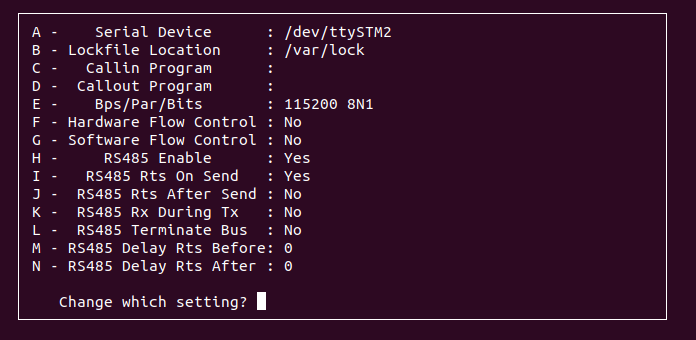
Note CAN
Connect CANBUS pins on J33 to a compatible transceiver.
ip link set can0 type can bitrate 125000
ifconfig can0 up

cansend can0 123#1122334455667788
candump can0
Note Display
export XDG_RUNTIME_DIR=/home/weston
export WAYLAND_DISPLAY=wayland-1
gst-launch-1.0 videotestsrc ! video/x-raw,width=1024,height=600 ! videoconvert ! waylandsink
Note Backlight
echo 0 > /sys/class/backlight/panel-backlight/brightness
echo 1 > /sys/class/backlight/panel-backlight/brightness
Note Touchscreen
Note Reprom
# WRITE with
echo "EEPROM_TEST_123" | tee /sys/bus/i2c/devices/0-0053/eeprom
EEPROM_TEST_123
# READ with
head -c 16 /sys/bus/i2c/devices/0-0053/eeprom
EEPROM_TEST_123
Note Strip Connector
UART_EXT
Close pins 1-2 on J2.
Serial Device to /dev/ttySTM4. Check that characters typed from keyboard are echoed in the terminal.
CAN_EXT
Not tested - stm32mp235 does not support 2 can interfaces.
USB_EXT
Not tested - Not populated on board.
GPIO_I2C
Close pins 10-11 on J2.
gpioset GPIO4_I2C_SCL=0 &
gpioget GPIO3_I2C_SDA
# Reads: "GPIO3_I2C_SDA"=inactive

gpioset GPIO3_I2C_SDA=1 &
gpioget GPIO4_I2C_SCL
# Reads: "GPIO4_I2C_SCL"=active


### GPIO_EXT
Close pins 13-14 on J2.
```bash
gpioset GPIO1=0 &
gpioget GPIO2
# Reads: "GPIO2"=inactive

gpioset GPIO2=1 &
gpioget GPIO1
# Reads: "GPIO1"=active