Test Sheet: MicroDev
Yocto Version
This test sheet targets the walnascar release of the NXP BSP. If you are working on a different Yocto version, refer to the corresponding test sheet on the meta-engicam-nxp branch for your release.
Test sheet MicroGea MX6ULL
Test sheet
Version: 1.0
Preliminary
Creation of engicam-evaluation-image-mx6ull image for sdcard booting and same image for nand programming.
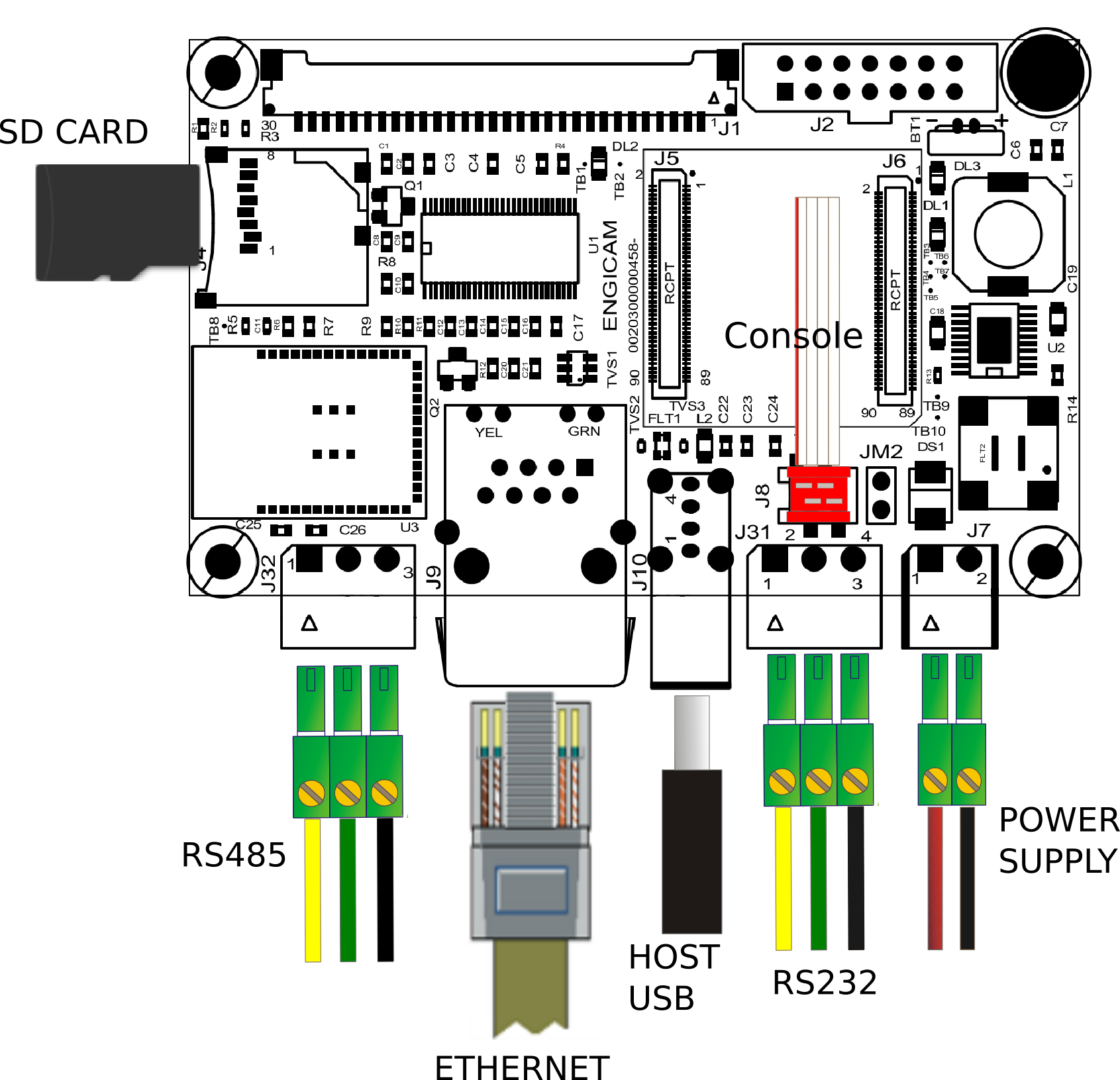
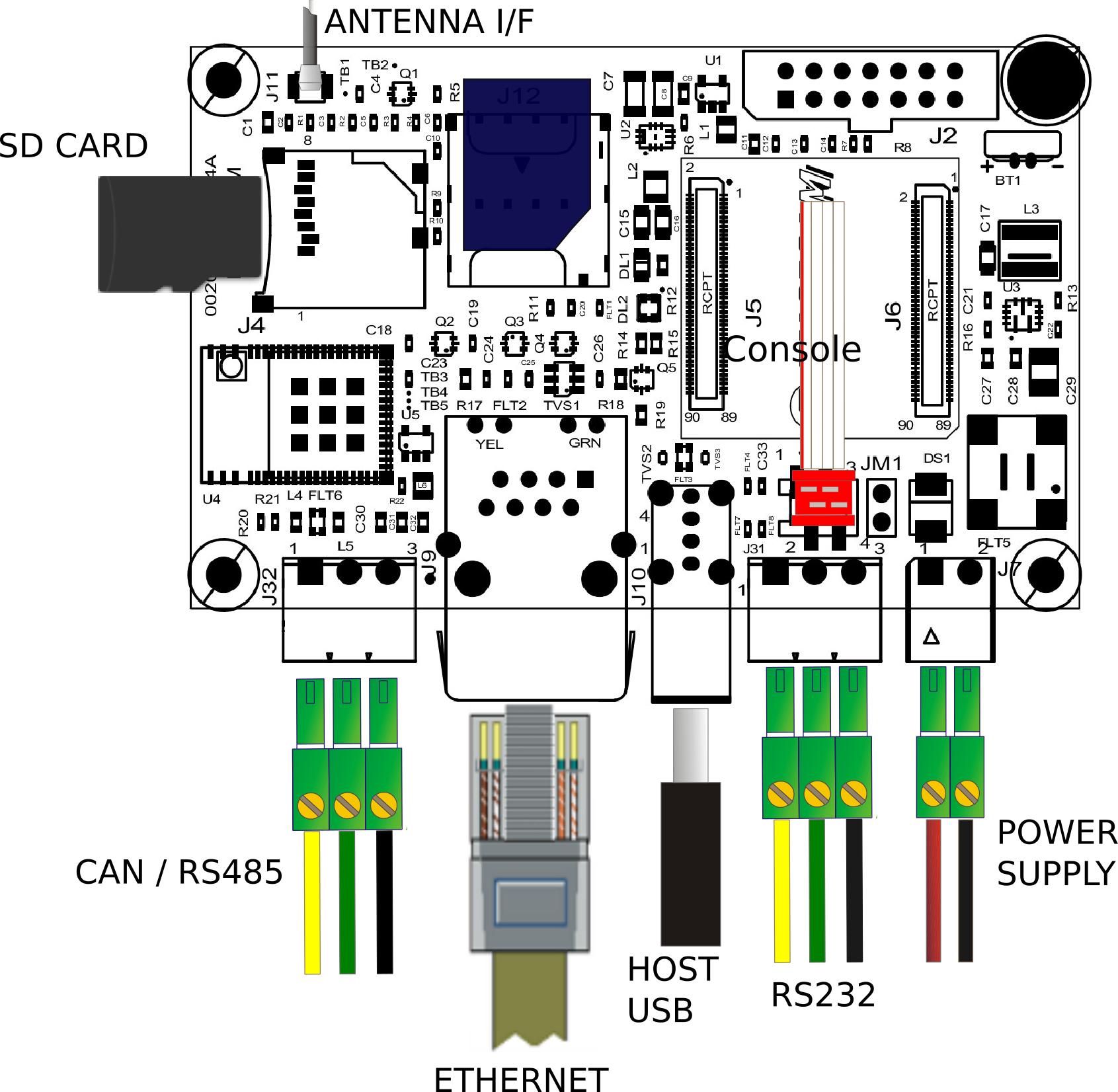
Board Type: Microdev 2.0 (left image), Microdev Rev 3 (right image)
SOM Type: Microgea MX6ULL
U-boot tests
| Test | Status |
|---|---|
| Nand Enviroment saving | OK |
| Sdcard Enviroment saving | OK |
| Ethernet | OK |
| Boot from nand | OK |
| Boot from sdcard | OK |
| Nand flash Programming from ethernet | OK |
| Linux Console | OK |
Test Notes:
Nand Environment saving
Sdcard environment saving
Close the connector JM1:
Ethernet
Once the serverip has been saved:
The output should be:
Boot from NAND
The output should be:
Saving Environment to NAND...
Erasing NAND...
Erasing at 0x1c0000 -- 100% complete.
Writing to NAND... OK
Boot from sdcard
Close the connector JM1:
The output should be:
Nand flash programming from ethernet
Kernel Linux tests
| Status | Test | Note |
|---|---|---|
| OK | Ethernet | see note1 |
| OK | USB | |
| OK | MMC card | |
| OK | UART 232 ttymxc4 J31 | see note2 |
| TBT | UART 485 ttymxc1 J32 | see note3 |
| OK | Linux Console J8 | |
| OK | WIFI | see note4 |
| OK | BLUETOOTH | see note5 |
| OK | UMTS | see note6 |
| OK | RTC | see note7 |
Only for Microdev 2.0
| Status | Test | Note |
|---|---|---|
| OK | LVDS | |
| OK | Backlight | see note8 |
| OK | Touchscreen | see note9 |
Note
Note 1
ping -c4 10.24.0.1
PING 10.24.0.1 (10.24.0.1) 56(84) bytes of data.
64 bytes from 10.24.0.1: icmp_seq=1 ttl=254 time=41.0 ms
64 bytes from 10.24.0.1: icmp_seq=2 ttl=254 time=41.1 ms
64 bytes from 10.24.0.1: icmp_seq=3 ttl=254 time=40.9 ms
64 bytes from 10.24.0.1: icmp_seq=4 ttl=254 time=40.9 ms

--- 10.24.0.1 ping statistics ---
4 packets transmitted, 4 received, 0% packet loss, time 3005ms
rtt min/avg/max/mdev = 40.850/40.939/41.064/0.080 ms
Note 2
Before launch the test_serial tool the dma's firmware must to be loaded from system. The loading is made automaticaly after few seconds at the end of boot. When loading is done, the console shows the message below:
Connect TX/RX PIN connector J31 to the UART 232 port From terminal launch command:
or
Verify that the characters written from keyboard are echoed in terminal.
Note 3
Before launch the test_serial tool the dma's firmware must to be loaded from system. The loading is made automaticaly after few seconds at the end of boot. When loading is done, the console shows the message below:
Tested with other RS485 device connected with command:
Note 4
Simple script for wifi testing:
ifconfig eth0 down
echo "nameserver 8.8.8.8" > /etc/resolv.conf
ifconfig wlan0 up
iw dev wlan0 scan | grep SSID
wpa_passphrase SSID password > /etc/wpa_supplicant.conf
wpa_supplicant -iwlan0 -Dnl80211 -c/etc/wpa_supplicant.conf -B
udhcpc -i wlan0
On walnascar wpa_supplicant 2.11 doen't work properly with brcmfmac driver. If you want to use wpa_supplicant include the package:
in your image.
Alternatively you can use iwd. Remember to uncomment the line
inside recipe /recipes-core/packagegroups/packagegroup.bbappend.
At first use type:
$ iwctl
[iwd]# device list
Devices
--------------------------------------------------------------------------------
Name Address Powered Adapter Mode
--------------------------------------------------------------------------------
wlan0 ff:ff:ff:ff:ff:ff on phy0 station
[iwd]# device wlan0 set-property Powered on
[iwd]# device phy0 set-property Powered on
[iwd]# station wlan0 scan
[iwd]# station wlan0 get-networks
Available Networks
--------------------------------------------------------------------------------
Network name Security Signal
--------------------------------------------------------------------------------
> <SSID> psk ****
[iwd]# station wlan0 connect SSID
...passphrase will be reqested...
[iwd]# quit
$ udhcpc -i wlan0
$ ping www.google.com
PING www.google.com (216.58.209.36) 56(84) bytes of data.
64 bytes from mil07s12-in-f4.1e100.net (216.58.209.36): icmp_seq=1 ttl=114 time=37.1 ms
64 bytes from mil07s12-in-f4.1e100.net (216.58.209.36): icmp_seq=2 ttl=114 time=44.4 ms
64 bytes from mil07s12-in-f4.1e100.net (216.58.209.36): icmp_seq=3 ttl=114 time=46.4 ms
64 bytes from mil07s12-in-f4.1e100.net (216.58.209.36): icmp_seq=4 ttl=114 time=44.6 ms
64 bytes from mil07s12-in-f4.1e100.net (216.58.209.36): icmp_seq=5 ttl=114 time=44.3 ms
...
iwd automatically stores network passphrases in the /var/lib/iwd directory and uses them to auto-connect in the future.
Note 5
On revision - the bluetooth doesn't work due a schematic error.
Before launch the brcm_patchram_plus tool the dma's firmware must to be loaded from system. The loading is made automaticaly after few seconds at the end of boot. When loading is done, the console shows the message below (Microdev 3.0):
imx-sdma 20ec000.sdma: firmware found.
imx-sdma 20ec000.sdma: loaded firmware 3.6
brcmfmac: brcmf_c_preinit_dcmds: Firmware: BCM4373/0 wl0: Oct 8 2021 09:44:25 version 13.10.246.261 (4410652 CY) FWID 01-9585ba52
Simple script for bluetooth testing in Microdev 3.0:
systemctl start bluetooth
brcm_patchram_plus \
--patchram /etc/firmware/BCM4373A0_001.001.025.0103.0156.JRL.2AE.hcd \
--enable_hci --no2bytes --tosleep 50000 \
--baudrate 3000000 --use_baudrate_for_download \
/dev/ttymxc7 &
hciconfig hci0 up
bluetoothctl
agent on
scan on
And for Microdev 2.0:
systemctl start bluetooth
brcm_patchram_plus \
--patchram /etc/firmware/BCM43430A1.1DX.hcd \
--enable_hci --no2bytes --tosleep 50000 \
--baudrate 3000000 --use_baudrate_for_download \
/dev/ttymxc7 &
hciconfig hci0 up
bluetoothctl
agent on
scan on
Note 6
echo 0 > /sys/class/gpio/UMTS_RESET/value
sleep 0.5
echo 1 > /sys/class/gpio/UMTS_ON/value
sleep 0.5
echo 0 > /sys/class/gpio/UMTS_ON/value
sleep 0.5
# result after 5 seconds:
usb 1-1: New USB device found, idVendor=1e0e, idProduct=9001, bcdDevice= 3.18
usb 1-1: New USB device strings: Mfr=1, Product=2, SerialNumber=3
usb 1-1: Product: SimTech, Incorporated
usb 1-1: Manufacturer: SimTech, Incorporated
usb 1-1: SerialNumber: 0123456789ABCDEF
option 1-1:1.0: GSM modem (1-port) converter detected
usb 1-1: GSM modem (1-port) converter now attached to ttyUSB0
option 1-1:1.1: GSM modem (1-port) converter detected
usb 1-1: GSM modem (1-port) converter now attached to ttyUSB1
option 1-1:1.2: GSM modem (1-port) converter detected
usb 1-1: GSM modem (1-port) converter now attached to ttyUSB2
option 1-1:1.3: GSM modem (1-port) converter detected
usb 1-1: GSM modem (1-port) converter now attached to ttyUSB3
option 1-1:1.4: GSM modem (1-port) converter detected
usb 1-1: GSM modem (1-port) converter now attached to ttyUSB4
qmi_wwan 1-1:1.5: cdc-wdm0: USB WDM device
qmi_wwan 1-1:1.5 wwan0: register 'qmi_wwan' at usb-ci_hdrc.0-1, WWAN/QMI device, 1a:64:34:bc:ca:93
Note 7
Set a time and date to the clock:
Turn off the system and power it back on. Once it booted check that the date is the same:
Note 8
Tested with command:
where n is an integer from 0 to 100
Note 9
Tested with command:
Test sheet MicroGea MX8Ulp
Test sheet
Version: 1.0
Preliminary
Creation of engicam-evaluation-image-mx8 image for sdcard booting and same image for eMMC programming.
Board Type: Microdev 2.0 (left image), Microdev Rev 3 (right image)
SOM Type: MicroGEA MX8ULP
U-boot tests
| Test | Status |
|---|---|
| eMMC Enviroment saving | OK |
| Sdcard Enviroment saving | OK |
| Ethernet | OK |
| Boot from eMMC | OK |
| Boot from sdcard | OK |
| Linux Console | OK |
| USB | OK |
Test Notes:
eMMC Environment saving
Sdcard environment saving
Close the connector JM1:
Ethernet
Once the serverip has been saved:
The output should be:
Boot from eMMC
The output should be:
Boot from sdcard
Close the connector JM1:
The output should be:
USB
Plug USB storage devices in J10:
The output should be:
starting USB...
Bus usb@29900000: USB EHCI 1.00
Bus usb@29920000: USB EHCI 1.00
scanning bus usb@29900000 for devices... 2 USB Device(s) found
scanning bus usb@29920000 for devices... 2 USB Device(s) found
scanning usb for storage devices... 1 Storage Device(s) found
The output should be (for example):
USB device tree:
1 Hub (480 Mb/s, 0mA)
| u-boot EHCI Host Controller
|
+-2 Vendor specific (480 Mb/s, 2mA)
Qualcomm CDMA Technologies MSM QHSUSB__BULK
1 Hub (480 Mb/s, 0mA)
| u-boot EHCI Host Controller
|
+-2 Mass Storage (480 Mb/s, 100mA)
Lexar USB Flash Drive AAGQFTGHNCK9GDXE
Once done do:
to safely remove storage devices.
Kernel Linux tests
| Status | Test | Note |
|---|---|---|
| OK | Ethernet | see note1 |
| OK | USB | |
| OK | MMC card | |
| TBT | M33 DEBUG J31 | |
| OK | UART 485 ttyLP2 J32 | see note2 |
| OK | Linux Console J8 | |
| OK | WIFI | see note3 |
| N/A | BLUETOOTH | see note4 |
| OK | UMTS | see note5 |
| OK | RTC | see note6 |
| TBT | CAN J32 | see note7 |
Only for Microdev 2.0
| Status | Test | Note |
|---|---|---|
| OK | LVDS | see note8 |
| OK | Backlight | see note9 |
| OK | Touchscreen | see note10 |
| OK | GPU | see note11 |
Note
Note 1
ping -c4 10.24.0.1
PING 10.24.0.1 (10.24.0.1) 56(84) bytes of data.
64 bytes from 10.24.0.1: icmp_seq=1 ttl=254 time=41.0 ms
64 bytes from 10.24.0.1: icmp_seq=2 ttl=254 time=41.1 ms
64 bytes from 10.24.0.1: icmp_seq=3 ttl=254 time=40.9 ms
64 bytes from 10.24.0.1: icmp_seq=4 ttl=254 time=40.9 ms
--- 10.24.0.1 ping statistics ---
4 packets transmitted, 4 received, 0% packet loss, time 3005ms
rtt min/avg/max/mdev = 40.850/40.939/41.064/0.080 ms
Note 2
Tested with other RS485 device connected with command:
This is supported only if the board lacks a CAN transceiver bound to J32 connector.
Note 3
Simple script for wifi testing:
ifconfig eth0 down
echo "nameserver 8.8.8.8" > /etc/resolv.conf
ifconfig wlan0 up
iw dev wlan0 scan | grep SSID
wpa_passphrase SSID password > /etc/wpa_supplicant.conf
wpa_supplicant -iwlan0 -Dnl80211 -c/etc/wpa_supplicant.conf -B
udhcpc -i wlan0
On walnascar wpa_supplicant 2.11 doen't work properly with brcmfmac driver. If you want to use wpa_supplicant include the package:
in your image.
Alternatively you can use iwd. Remember to uncomment the line
inside recipe /recipes-core/packagegroups/packagegroup.bbappend.
At first use type:
$ iwctl
[iwd]# device list
                           Devices
--------------------------------------------------------------------------------
  Name                  Address               Powered     Adapter     Mode
--------------------------------------------------------------------------------
  wlan0                 ff:ff:ff:ff:ff:ff     on          phy0        station

[iwd]# device wlan0 set-property Powered on
[iwd]# device phy0 set-property Powered on
[iwd]# station wlan0 scan
[iwd]# station wlan0 get-networks
                                 Available Networks
--------------------------------------------------------------------------------
    Network name                         Security                Signal
--------------------------------------------------------------------------------
>   <SSID>                               psk                     ****

[iwd]# station wlan0 connect SSID
...passphrase will be reqested...
[iwd]# quit
$ udhcpc -i wlan0
$ ping www.google.com
PING www.google.com (216.58.209.36) 56(84) bytes of data.
64 bytes from mil07s12-in-f4.1e100.net (216.58.209.36): icmp_seq=1 ttl=114 time=37.1 ms
64 bytes from mil07s12-in-f4.1e100.net (216.58.209.36): icmp_seq=2 ttl=114 time=44.4 ms
64 bytes from mil07s12-in-f4.1e100.net (216.58.209.36): icmp_seq=3 ttl=114 time=46.4 ms
64 bytes from mil07s12-in-f4.1e100.net (216.58.209.36): icmp_seq=4 ttl=114 time=44.6 ms
64 bytes from mil07s12-in-f4.1e100.net (216.58.209.36): icmp_seq=5 ttl=114 time=44.3 ms
...
iwd automatically stores network passphrases in the /var/lib/iwd directory and uses them to auto-connect in the future.
Note 4
Bluetooth is not available at the moment for kernel lacks rpmsg driver to talk with lpuart0 device on M33.
Simple script for bluetooth testing in Microdev 3.0:
systemctl start bluetooth
brcm_patchram_plus \
--patchram /etc/firmware/BCM4373A0_001.001.025.0103.0156.JRL.2AE.hcd \
--enable_hci --no2bytes --tosleep 50000 \
--baudrate 3000000 --use_baudrate_for_download \
/dev/ttyLPx &
hciconfig hci0 up
bluetoothctl
agent on
scan on
And for Microdev 2.0:
systemctl start bluetooth
brcm_patchram_plus \
--patchram /etc/firmware/BCM43430A1.1DX.hcd \
--enable_hci --no2bytes --tosleep 50000 \
--baudrate 3000000 --use_baudrate_for_download \
/dev/ttyLPx &
hciconfig hci0 up
bluetoothctl
agent on
scan on
Note 5
echo 0 > /sys/class/gpio/UMTS_RESET/value
sleep 0.5
echo 1 > /sys/class/gpio/UMTS_ON/value
sleep 0.5
echo 0 > /sys/class/gpio/UMTS_ON/value
sleep 0.5

# result after 5 seconds:

usb 1-1: New USB device found, idVendor=1e0e, idProduct=9001, bcdDevice= 3.18
usb 1-1: New USB device strings: Mfr=1, Product=2, SerialNumber=3
usb 1-1: Product: SimTech, Incorporated
usb 1-1: Manufacturer: SimTech, Incorporated
usb 1-1: SerialNumber: 0123456789ABCDEF
option 1-1:1.0: GSM modem (1-port) converter detected
usb 1-1: GSM modem (1-port) converter now attached to ttyUSB0
option 1-1:1.1: GSM modem (1-port) converter detected
usb 1-1: GSM modem (1-port) converter now attached to ttyUSB1
option 1-1:1.2: GSM modem (1-port) converter detected
usb 1-1: GSM modem (1-port) converter now attached to ttyUSB2
option 1-1:1.3: GSM modem (1-port) converter detected
usb 1-1: GSM modem (1-port) converter now attached to ttyUSB3
option 1-1:1.4: GSM modem (1-port) converter detected
usb 1-1: GSM modem (1-port) converter now attached to ttyUSB4
qmi_wwan 1-1:1.5: cdc-wdm0: USB WDM device
qmi_wwan 1-1:1.5 wwan0: register 'qmi_wwan' at usb-ci_hdrc.0-1, WWAN/QMI device, 1a:64:34:bc:ca:93
Note 6
Set a time and date to the clock:
Turn off the system and power it back on. Once it booted check that the date is the same:
Note 7
Test with two Microdev 3.0 via M33 example app flexcan ping_pong_buffer_transfer. A specific mount option with CAN transceiver is required for CAN support on Microdev 3.0.
On Microdev 2.0 CAN is only supported on boards with specific mount option where a CAN transceiver is bound to J32 connector. But Soc MX8ULP does not have linux kernel driver for FlexIO simulating CAN at the moment.
Note 9
Tested with command:
Note 10
Tested with command:
where n is an integer from 0 to 100
Note 11
Tested with command:
Note 12
Use benchmark tool Glmark2:
Test sheet MicroGea MX91
Test sheet
Version: 1.0
Preliminary
Creation of engicam-evaluation-image-mx93 image for sdcard booting and same image for eMMC programming.
Board Type: Microdev 2.0 (left image), Microdev Rev 3 (right image)
SOM Type: MicroGEA MX91
U-boot tests
| Test | Status |
|---|---|
| eMMC Enviroment saving | OK |
| Sdcard Enviroment saving | OK |
| Ethernet | OK |
| Boot from eMMC | OK |
| Boot from sdcard | OK |
| Linux Console | OK |
| USB | OK |
Test Notes:
eMMC Environment saving
Sdcard environment saving
Close the connector JM1:
Ethernet
Once the serverip has been saved:
The output should be:
Boot from eMMC
The output should be:
Boot from sdcard
Close the connector JM1:
The output should be:
USB
Plug USB storage devices in J10:
The output should be:
starting USB...
Bus usb@29900000: USB EHCI 1.00
Bus usb@29920000: USB EHCI 1.00
scanning bus usb@29900000 for devices... 2 USB Device(s) found
scanning bus usb@29920000 for devices... 2 USB Device(s) found
       scanning usb for storage devices... 1 Storage Device(s) found
The output should be (for example):
USB device tree:
  1  Hub (480 Mb/s, 0mA)
  |  u-boot EHCI Host Controller
  |
  +-2  Vendor specific (480 Mb/s, 2mA)
       Qualcomm CDMA Technologies MSM QHSUSB__BULK

  1  Hub (480 Mb/s, 0mA)
  |  u-boot EHCI Host Controller
  |
  +-2  Mass Storage (480 Mb/s, 100mA)
       Lexar USB Flash Drive AAGQFTGHNCK9GDXE
Once done do:
to safely remove storage devices.
Kernel Linux tests
| Status | Test | Note |
|---|---|---|
| OK | Ethernet | see note1 |
| OK | USB | |
| OK | MMC card | |
| OK | UART 232 ttyLP1 J31 | |
| OK | UART 485 ttyLP4 J32 | see note2 |
| OK | Linux Console J8 | |
| OK | WIFI | see note3 |
| OK | BLUETOOTH | see note4 |
| OK | UMTS | see note5 |
| OK | RTC | see note6 |
| TBT | CAN J32 | see note7 |
Only for Microdev 2.0
| Status | Test | Note |
|---|---|---|
| KO | CAN J32 | see note7 |
| TBT | UART 485 ttyLP4 J32 | see note2 |
| OK | LVDS | see note8 |
| OK | Backlight | see note9 |
| OK | Touchscreen | see note10 |
Note
Note 1
ping -c4 10.24.0.1
PING 10.24.0.1 (10.24.0.1) 56(84) bytes of data.
64 bytes from 10.24.0.1: icmp_seq=1 ttl=254 time=41.0 ms
64 bytes from 10.24.0.1: icmp_seq=2 ttl=254 time=41.1 ms
64 bytes from 10.24.0.1: icmp_seq=3 ttl=254 time=40.9 ms
64 bytes from 10.24.0.1: icmp_seq=4 ttl=254 time=40.9 ms

--- 10.24.0.1 ping statistics ---
4 packets transmitted, 4 received, 0% packet loss, time 3005ms
rtt min/avg/max/mdev = 40.850/40.939/41.064/0.080 ms
Note 2
This is supported only if the board has a rs485 transceiver bound to J32 connector.
Tested on Microdev 3.0 with other RS485 device connected with command:
Note 3
Simple script for wifi testing:
ifconfig eth0 down
echo "nameserver 8.8.8.8" > /etc/resolv.conf
ifconfig wlan0 up
iw dev wlan0 scan | grep SSID
wpa_passphrase SSID password > /etc/wpa_supplicant.conf
wpa_supplicant -iwlan0 -Dnl80211 -c/etc/wpa_supplicant.conf -B
udhcpc -i wlan0
On walnascar wpa_supplicant 2.11 doen't work properly with brcmfmac driver. If you want to use wpa_supplicant include the package:
in your image.
Alternatively you can use iwd. Remember to uncomment the line
inside recipe /recipes-core/packagegroups/packagegroup.bbappend.
At first use type:
$ iwctl
[iwd]# device list
                           Devices
--------------------------------------------------------------------------------
  Name                  Address               Powered     Adapter     Mode
--------------------------------------------------------------------------------
  wlan0                 ff:ff:ff:ff:ff:ff     on          phy0        station

[iwd]# device wlan0 set-property Powered on
[iwd]# device phy0 set-property Powered on
[iwd]# station wlan0 scan
[iwd]# station wlan0 get-networks
                                 Available Networks
--------------------------------------------------------------------------------
    Network name                         Security                Signal
--------------------------------------------------------------------------------
>   <SSID>                               psk                     ****

[iwd]# station wlan0 connect SSID
...passphrase will be reqested...
[iwd]# quit
$ udhcpc -i wlan0
$ ping www.google.com
PING www.google.com (216.58.209.36) 56(84) bytes of data.
64 bytes from mil07s12-in-f4.1e100.net (216.58.209.36): icmp_seq=1 ttl=114 time=37.1 ms
64 bytes from mil07s12-in-f4.1e100.net (216.58.209.36): icmp_seq=2 ttl=114 time=44.4 ms
64 bytes from mil07s12-in-f4.1e100.net (216.58.209.36): icmp_seq=3 ttl=114 time=46.4 ms
64 bytes from mil07s12-in-f4.1e100.net (216.58.209.36): icmp_seq=4 ttl=114 time=44.6 ms
64 bytes from mil07s12-in-f4.1e100.net (216.58.209.36): icmp_seq=5 ttl=114 time=44.3 ms
...
iwd automatically stores network passphrases in the /var/lib/iwd directory and uses them to auto-connect in the future.
Note 4
Simple script for bluetooth testing in Microdev 3.0:
brcm_patchram_plus \
--patchram /etc/firmware/BCM4373A0_001.001.025.0103.0156.JRL.2AE.hcd \
--enable_hci --no2bytes --tosleep 1000 \
--baudrate 3000000 --use_baudrate_for_download \
/dev/ttyLP3 &
hciconfig hci0 up
hcitool scan
And for Microdev 2.0:
systemctl start bluetooth
brcm_patchram_plus \
  --patchram /etc/firmware/BCM43430A1.1DX.hcd \
  --enable_hci --no2bytes --tosleep 50000 \
  --baudrate 3000000 --use_baudrate_for_download \
  /dev/ttyLPx &

hciconfig hci0 up
bluetoothctl
agent on
scan on
Note 5
gpioset -z -c 4 6=1             # set UMTS_EN to 1
gpioset -z -c 4 9=0             # set UMTS_RESET to 0
gpioset -z -t 500,0 -c 4 10=1   # toggle UMTS_ON

# result after 5 seconds (dmesg output):

[  556.731065] usb 1-1: new high-speed USB device number 2 using ci_hdrc
[  556.983545] usbcore: registered new interface driver option
[  556.984158] usbserial: USB Serial support registered for GSM modem (1-port)
[  556.984402] option 1-1:1.0: GSM modem (1-port) converter detected
[  556.990733] usb 1-1: GSM modem (1-port) converter now attached to ttyUSB0
[  556.991208] option 1-1:1.1: GSM modem (1-port) converter detected
[  556.999211] usbcore: registered new interface driver cdc_wdm
[  557.000043] usb 1-1: GSM modem (1-port) converter now attached to ttyUSB1
[  557.000391] option 1-1:1.2: GSM modem (1-port) converter detected
[  557.000804] usb 1-1: GSM modem (1-port) converter now attached to ttyUSB2
[  557.002446] option 1-1:1.3: GSM modem (1-port) converter detected
[  557.005068] usb 1-1: GSM modem (1-port) converter now attached to ttyUSB3
[  557.015785] option 1-1:1.4: GSM modem (1-port) converter detected
[  557.017206] usb 1-1: GSM modem (1-port) converter now attached to ttyUSB4
[  557.026400] qmi_wwan 1-1:1.5: cdc-wdm0: USB WDM device
[  557.028491] qmi_wwan 1-1:1.5 wwan0: register 'qmi_wwan' at usb-ci_hdrc.0-1, WWAN/QMI device, 22:f1:71:cf:44:fa
[  557.035166] usbcore: registered new interface driver qmi_wwan
Note 6
Set a time and date to the clock:
Turn off the system and power it back on. Once it booted check that the date is the same:
Note 7
On Microdev CAN is only supported on boards with specific mount option where a CAN transceiver is bound to J32 connector.
Microdev 2.0: CAN option Microdev 3.0: UART rs485 option
Note 8
Tested with command:
Note 9
Tested with command:
where n is an integer from 0 to 100
Note 10
Tested with command: