Test Sheet: Loco 5
Yocto Version
This test sheet targets the walnascar release of the NXP BSP. If you are working on a different Yocto version, refer to the corresponding test sheet on the meta-engicam-nxp branch for your release.
Test sheet MicroGea MX6ULL Loco 5
Test sheet
Version: 1.0
Preliminary
Creation of engicam-evaluation-image-mx6ull image for sdcard booting and same image for nand programming.
Board Type: Loco 5
SOM Type: Microgea
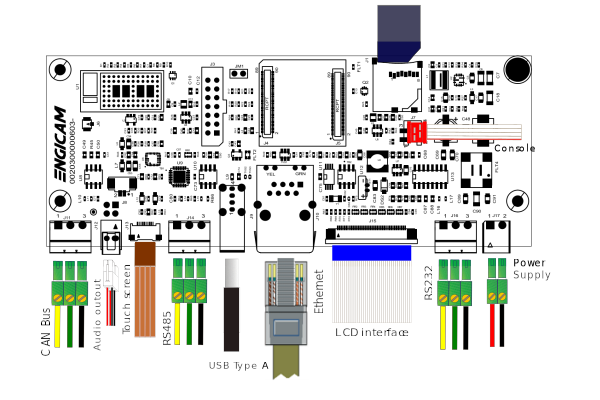
U-boot tests
| Test | Status |
|---|---|
| Nand Enviroment saving | OK |
| Sdcard Enviroment saving | OK |
| Ethernet | OK |
| Boot from nand | OK |
| Boot from sdcard | OK |
| Nand flash Programming from ethernet | OK |
| Linux Console | OK |
Test Notes:
Nand Environment saving
Sdcard environment saving
Close the connector JM1:
Ethernet
Once the serverip has been saved:
The output should be:
Boot from NAND
The output should be:
Saving Environment to NAND...
Erasing NAND...
Erasing at 0x1c0000 -- 100% complete.
Writing to NAND... OK
Boot from sdcard
Close the connector JM1:
The output should be:
Nand flash programming from ethernet
Kernel Linux tests
| Status | Test | Note |
|---|---|---|
| OK | Ethernet | see note1 |
| OK | USB | |
| OK | MMC card | |
| OK | UART 232 ttymxc4 J16 | see note2 |
| TB | UART 485 ttymxc1 J14 | see note3 |
| OK | Linux Console J7 | |
| OK | WIFI | see note4 |
| OK | BLUETOOTH | see note5 |
| OK | RTC | see note6 |
| OK | LVDS | |
| OK | Backlight | see note7 |
| OK | Touchscreen | see note8 |
| OK | Can Bus J11 | see note9 |
| TBT | Audio | see note10 |
Note
Note 1
ping -c4 10.24.0.1
PING 10.24.0.1 (10.24.0.1) 56(84) bytes of data.
64 bytes from 10.24.0.1: icmp_seq=1 ttl=254 time=41.0 ms
64 bytes from 10.24.0.1: icmp_seq=2 ttl=254 time=41.1 ms
64 bytes from 10.24.0.1: icmp_seq=3 ttl=254 time=40.9 ms
64 bytes from 10.24.0.1: icmp_seq=4 ttl=254 time=40.9 ms

--- 10.24.0.1 ping statistics ---
4 packets transmitted, 4 received, 0% packet loss, time 3005ms
rtt min/avg/max/mdev = 40.850/40.939/41.064/0.080 ms
Note 2
Tested by close tx/rx:
test_serial ttymxc4
Type q to quit.

Device name: /dev/ttymxc4
?:prova
wrote 5 chars: prova
read 5 chars: prova
****Response is prova
Note 3
Tested with other RS485 device connected with command:
Note 4
Simple script for wifi testing:
modprobe moal mod_para=nxp/wifi_mod_para.conf
ifconfig mlan0 up
iw dev mlan0 scan | grep SSID
wpa_passphrase SSID PASSWORD > /etc/wpa_supplicant.conf
wpa_supplicant -imlan0 -Dnl80211 -c/etc/wpa_supplicant.conf -B
udhcpc -imlan0
Note 5
Simple script for bluetooth testing:
Note 6
Set a time and date to the clock:
Turn off the system and power it back on. Once it booted check that the date is the same:
Note 7
Tested with command:
where n is an integer from 0 to 100
Note 8
Tested with command:
Note 9
Tested with command:
ip link set can0 type can bitrate 125000
ifconfig can0 up
# To receive a frame:
cantest can0
# To send a frame:
cantest can0 5A1#11.2233.44556677.88
Note 10
Add these packages to the recipe:
alsa-utils \
packagegroup-fsl-tools-audio \
packagegroup-fsl-gstreamer1.0 \
packagegroup-fsl-gstreamer1.0-full \
Tested with command:
Test sheet MicroGea MX8Ulp Loco 5
Test sheet
Version: 1.0
Preliminary
Creation of engicam-evaluation-image-mx8 image for sdcard booting and same image for eMMC programming.
Board Type: Loco 5
SOM Type: MicroGEA MX8ULP
U-boot tests
| Test | Status |
|---|---|
| eMMC Enviroment saving | OK |
| Sdcard Enviroment saving | OK |
| Ethernet | OK |
| Boot from eMMC | OK |
| Boot from sdcard | OK |
| USB | OK |
Test Notes:
eMMC Environment saving
Sdcard environment saving
Close the connector JM1:
Ethernet
Once the serverip has been saved:
The output should be:
Boot from eMMC
The output should be:
Boot from sdcard
Close the connector JM1:
The output should be:
USB
Plug USB storage devices in J9:
The output should be:
starting USB...
Bus usb@29900000: USB EHCI 1.00
Bus usb@29920000: USB EHCI 1.00
scanning bus usb@29900000 for devices... 2 USB Device(s) found
scanning bus usb@29920000 for devices... 2 USB Device(s) found
       scanning usb for storage devices... 1 Storage Device(s) found
The output should be (for example):
USB device tree:
  1  Hub (480 Mb/s, 0mA)
     u-boot EHCI Host Controller

  1  Hub (480 Mb/s, 0mA)
  |  u-boot EHCI Host Controller
  |
  +-2  Mass Storage (480 Mb/s, 100mA)
       Lexar USB Flash Drive AAGQFTGHNCK9GDXE
Once done do:
to safely remove storage devices.
Kernel Linux tests
| Status | Test | Note |
|---|---|---|
| OK | Ethernet J10 | see note1 |
| OK | USB | |
| TBT | MMC card | |
| TBT | M33 DEBUG J16 | |
| OK | UART 485 ttyLP2 J14 | see note2 |
| OK | Linux Console J7 | |
| OK | WIFI | see note3 |
| N/A | BLUETOOTH | see note4 |
| OK | RTC | see note5 |
| TBT | LVDS | |
| TBT | Backlight | see note6 |
| TBT | Touchscreen | see note7 |
| N/A | Can Bus J11 | see note8 |
| N/A | Audio | see note9 |
Note
Note 1
ping -c4 10.24.0.1
PING 10.24.0.1 (10.24.0.1) 56(84) bytes of data.
64 bytes from 10.24.0.1: icmp_seq=1 ttl=254 time=41.0 ms
64 bytes from 10.24.0.1: icmp_seq=2 ttl=254 time=41.1 ms
64 bytes from 10.24.0.1: icmp_seq=3 ttl=254 time=40.9 ms
64 bytes from 10.24.0.1: icmp_seq=4 ttl=254 time=40.9 ms

--- 10.24.0.1 ping statistics ---
4 packets transmitted, 4 received, 0% packet loss, time 3005ms
rtt min/avg/max/mdev = 40.850/40.939/41.064/0.080 ms
Note 2
Tested with other RS485 device connected with command:
Note 3
Simple script for wifi testing:
modprobe moal mod_para=nxp/wifi_mod_para.conf
ifconfig mlan0 up
iw dev mlan0 scan | grep SSID
wpa_passphrase SSID PASSWORD > /etc/wpa_supplicant.conf
wpa_supplicant -imlan0 -Dnl80211 -c/etc/wpa_supplicant.conf -B
udhcpc -imlan0
echo "nameserver 8.8.8.8" > /etc/resolv.conf
Note 4
Simple script for bluetooth testing:
This device is not available at the moment. Linux kernel lacks driver to communicate with lpuart0 M33 module, the bus Bluetooth signals are wired to.
Note 5
Set a time and date to the clock:
Turn off the system and power it back on. Once it booted check that the date is the same:
Note 6
Tested with command:
where n is an integer from 0 to 100
Note 7
Tested with command:
Note 8
Tested with command:
ip link set can0 type can bitrate 125000
ifconfig can0 up
# To receive a frame:
cantest can0
# To send a frame:
cantest can0 5A1#11.2233.44556677.88
Note 9
Add these packages to the recipe:
alsa-utils \
packagegroup-fsl-tools-audio \
packagegroup-fsl-gstreamer1.0 \
packagegroup-fsl-gstreamer1.0-full \
Tested with command:
gst-launch-1.0 filesrc location=/usr/share/sounds/alsa/Side_Right.wav ! wavparse ! audioconvert ! audioresample ! alsasink device=hw:0,0
This device is not available at the moment. Linux kernel lacks code to drive SAI0 pins, the signals board audio codec is wired to.
Test sheet MicroGea MX91 Loco 5
Test sheet
Version: 1.0
Preliminary
Creation of engicam-evaluation-image-mx91 image for sdcard booting and same image for eMMC programming.
Board Type: Loco 5
SOM Type: MicroGEA MX91
U-boot tests
| Test | Status |
|---|---|
| eMMC Enviroment saving | OK |
| Sdcard Enviroment saving | OK |
| Ethernet | OK |
| Boot from eMMC | OK |
| Boot from sdcard | OK |
| USB | OK |
Test Notes:
eMMC Environment saving
Sdcard environment saving
Close the connector JM1:
Ethernet
Once the serverip has been saved:
The output should be:
Boot from eMMC
The output should be:
Boot from sdcard
Close the connector JM1:
The output should be:
USB
Plug USB storage devices in J9:
The output should be:
starting USB...
Bus usb@4c100000: Port not available.
Bus usb@4c200000: USB EHCI 1.00
scanning bus usb@4c200000 for devices... 2 USB Device(s) found
       scanning usb for storage devices... 1 Storage Device(s) found
The output should be (for example):
USB device tree:
  1  Hub (480 Mb/s, 0mA)
  |  u-boot EHCI Host Controller
  |
  +-2  Mass Storage (480 Mb/s, 100mA)
       USB 2.0 Flash Disk AB00007000005248
Once done do:
to safely remove storage devices.
Kernel Linux tests
| Status | Test | Note |
|---|---|---|
| OK | Ethernet J10 | see note1 |
| OK | USB | |
| OK | MMC card | |
| OK | UART 232 ttyLP1 J16 | see note2 |
| OK | UART 485 ttyLP2 J14 | see note3 |
| OK | Linux Console J7 | |
| OK | WIFI | see note4 |
| OK | BLUETOOTH | see note5 |
| OK | RTC | see note6 |
| OK | LVDS | |
| OK | Backlight | see note7 |
| OK | Touchscreen | see note8 |
| OK | Can Bus J11 | see note9 |
| TBT | Audio | see note10 |
Note
Note 1
ping -c4 10.24.0.1
PING 10.24.0.1 (10.24.0.1) 56(84) bytes of data.
64 bytes from 10.24.0.1: icmp_seq=1 ttl=254 time=41.0 ms
64 bytes from 10.24.0.1: icmp_seq=2 ttl=254 time=41.1 ms
64 bytes from 10.24.0.1: icmp_seq=3 ttl=254 time=40.9 ms
64 bytes from 10.24.0.1: icmp_seq=4 ttl=254 time=40.9 ms

--- 10.24.0.1 ping statistics ---
4 packets transmitted, 4 received, 0% packet loss, time 3005ms
rtt min/avg/max/mdev = 40.850/40.939/41.064/0.080 ms
Note 2
Connect TX/RX PIN connector J16 to the UART 232 port Type command:
Verify that the characters written from keyboard are echoed in terminal.
Note 3
Tested with other RS485 device connected with command:
Note 4
Simple script for wifi testing:
modprobe moal mod_para=nxp/wifi_mod_para.conf
ifconfig mlan0 up
iw dev mlan0 scan | grep SSID
wpa_passphrase SSID PASSWORD > /etc/wpa_supplicant.conf
wpa_supplicant -imlan0 -Dnl80211 -c/etc/wpa_supplicant.conf -B
udhcpc -imlan0
echo "nameserver 8.8.8.8" > /etc/resolv.conf
Note 5
Simple script for bluetooth testing:
Note 6
Set a time and date to the clock:
Turn off the system and power it back on. Once it booted check that the date is the same:
Note 7
Tested with command:
where n is an integer from 0 to 100
Note 8
Tested with command:
Note 9
Tested with command:
ip link set can0 type can bitrate 125000
ifconfig can0 up
# To receive a frame:
cantest can0
# To send a frame:
cantest can0 5A1#11.2233.44556677.88
Note 10
Add these packages to the recipe:
alsa-utils \
packagegroup-fsl-tools-audio \
packagegroup-fsl-gstreamer1.0 \
packagegroup-fsl-gstreamer1.0-full \
Tested with command: